

Container Payment Portal™

This portal, powered by PayCargo and the Gnosis Freight Container Lifecycle Management® Platform, serves as the primary TraPac customer interface for OSRA-compliant payment activities.
The portal supports:
- Import Demurrage Charges for TraPac Los Angeles, for ZIM American Integrated Shipping Services Co., LLC and Wan Hai Lines (Singapore) Pte. Ltd.
- Import Gate Fees, Terminal Fees, and Export Bookings for TraPac Oakland.

Manage demurrage, gate fees, and export bookings
Access container status, invoices, and payment workflows across all TraPac terminals. Reduce delays, improve visibility, and keep cargo moving.
Flexible payment options
Overnight Debit
Funds are withdrawn directly from your bank account.
Prepaid Funds
Add funds in advance and pay on your terms.
Credit Card
Pay using all major credit card providers.
PayCargo Credit
Access 15, 30, or 45-day terms, with limits from $50K to $5M.
Resources and tutorials
Learn how to manage payments, resolve disputes, and track container status in the portal.
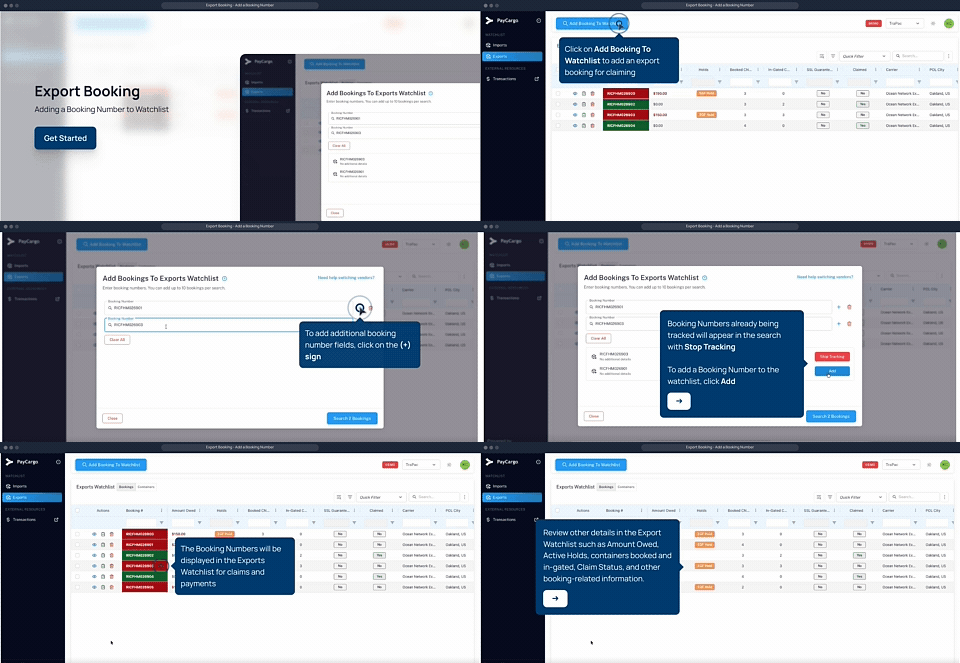
Adding a Booking Number
Learn how to add an export booking to your Watchlist so you can monitor charges and prepare for payment.
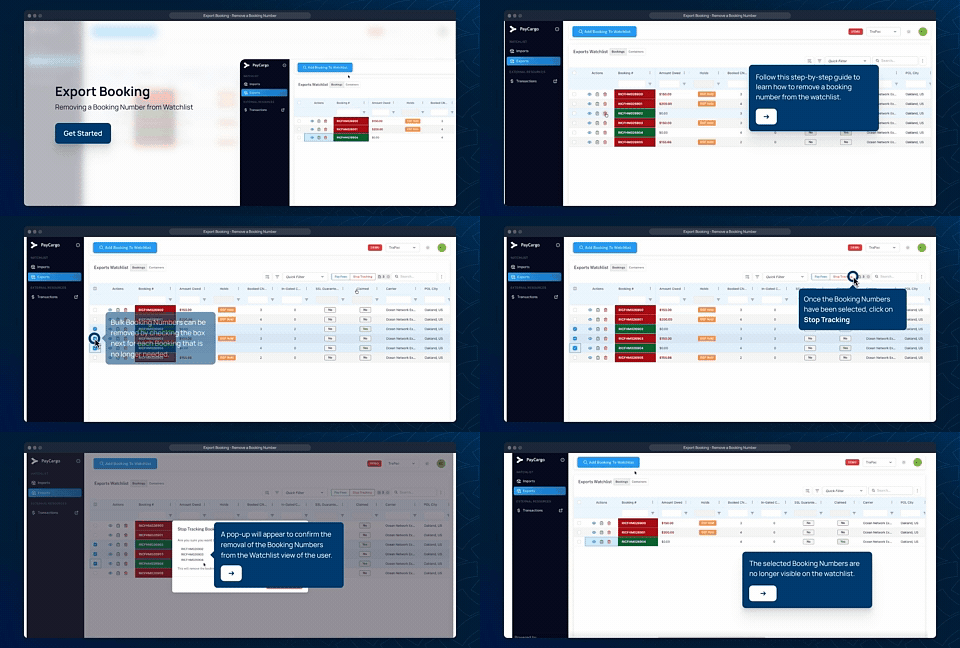
Removing a Booking Number
Remove a previously added booking from your Watchlist when it is no longer needed or was added in error.
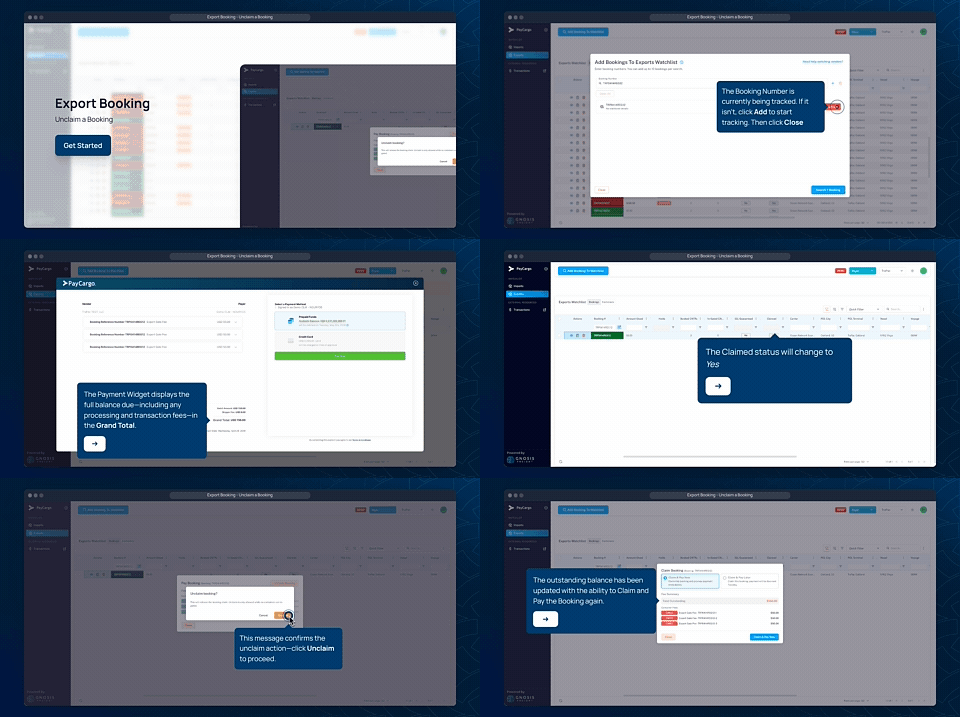
Unclaim a Booking
Release ownership of a claimed booking, allowing another authorized user or organization to claim and manage it.
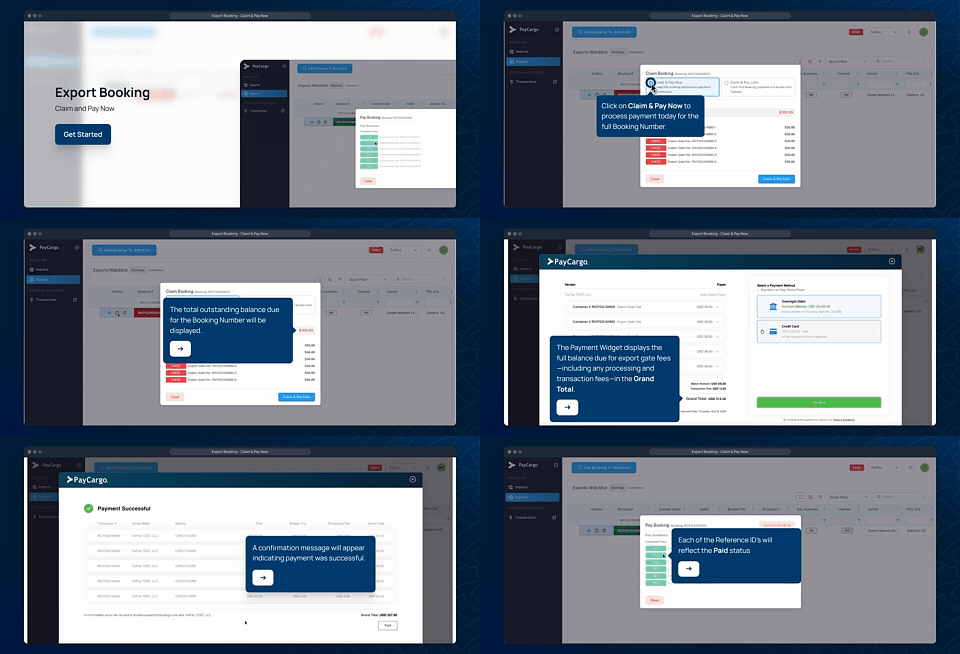
Claim & Pay Now
Claim an eligible export booking, review applicable fees, and complete payment through PayCargo before the container gates into the terminal.
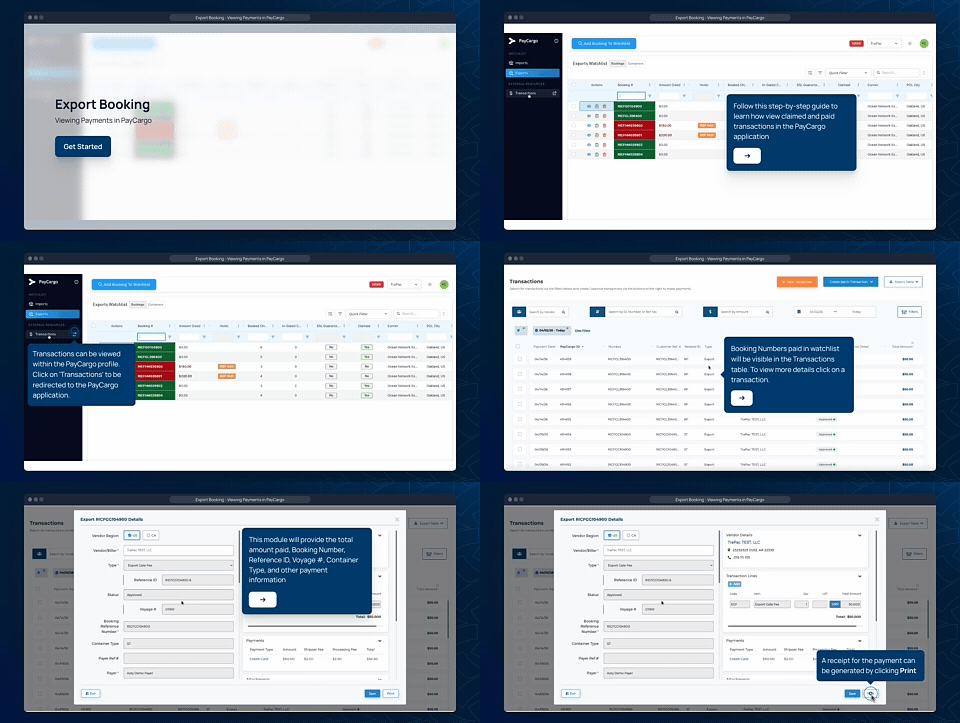
Viewing Transactions in PayCargo
View payment history, transaction details, receipts, and the current status of your completed export payments.
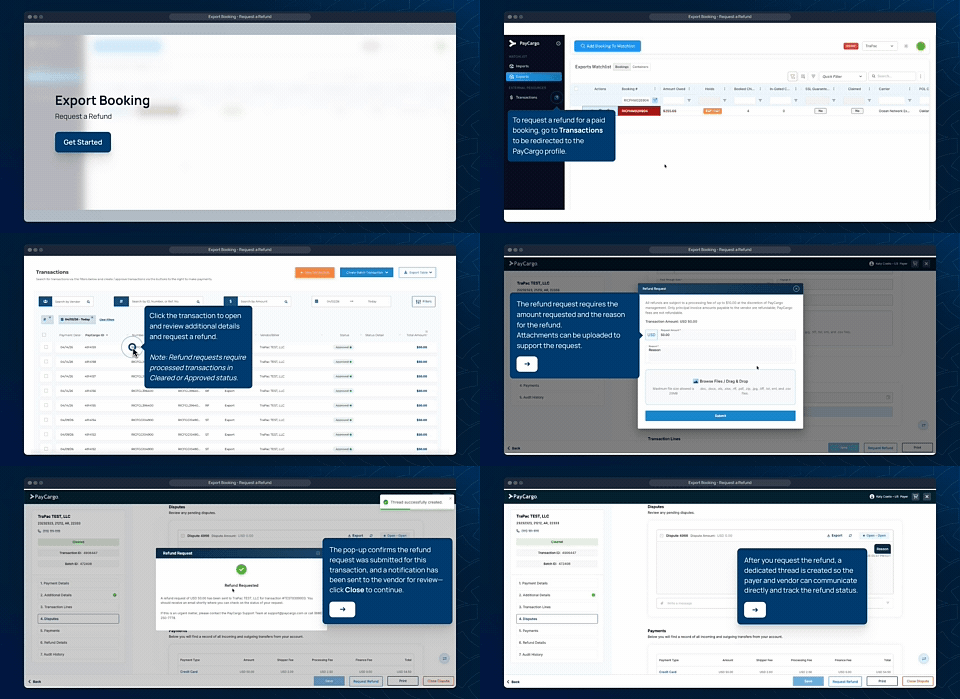
Request a Refund
Submit a refund request for eligible transactions and monitor the status of your refund through PayCargo.
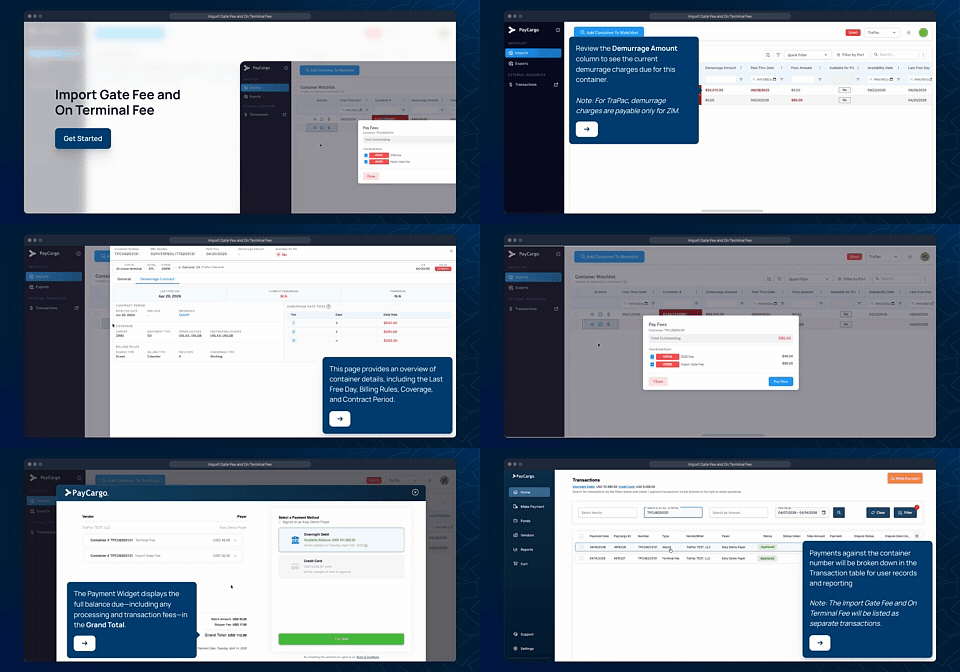
Import Gate Fees & On-Terminal Fees
Learn how to locate containers in the Watchlist, review outstanding Import Gate Fees (IGF) and On-Terminal Fees, and complete payment before terminal pickup.
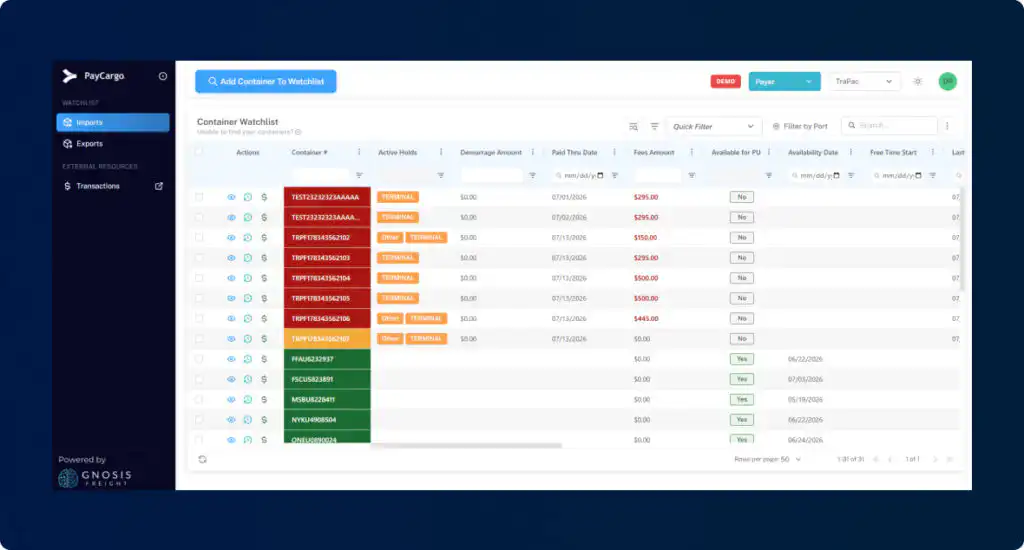
Paying Demurrage Fees
Learn how to review outstanding demurrage charges and complete payment through PayCargo.
Get started
Manage payments and take action
Frequently asked questions
Find answers to common questions about getting started, payments, container status, and support.
General Questions
What is the Container Payment Portal Watchlist
The watchlist allows customers to view, claim, and pay terminal-related fees associated with import and export container movements. Fees may include:
- Export Gate Fees (EGF)
- Import Gate Fees (IGF)
- On-Terminal Fees (OTF)
- Other terminal charges displayed in the Watchlist
Payments made through the watchlist electronically transmitted to the terminal, allowing holds to be released once payment is confirmed.
Who can use the CPP watchlist to pay fees?
The watchlist can be used by:
- Trucking companies
- Beneficial Cargo Owners (BCOs)
- Freight Forwarders
- Ocean Carriers (where applicable)
- Other authorized payers with a PayCargo account
Where can I find containers or bookings that require payment?
All outstanding bookings and containers requiring payment will appear in the CPP Watchlist.
The CPP Watchlist displays:
- Booking number
- Container number (when available)
- Vessel/Voyage information
- Fee type
- Fee amount due
- Hold status
- Payment status
Is there a fee to pay my TraPac fees using PayCargo?
As part of this initiative, customers paying TraPac fees through PayCargo are exempt from the annual PayCargo fee.
Can I pay multiple fees in a single payment?
Yes. For Export Gate Fees (EGF), Import Gate Fees (IGF), and On-Terminal Fees (OTF), you can select and pay one or multiple fees in a single payment. This allows you to save time by completing multiple payments at once. A separate receipt will be generated for each transaction included in the payment.
Gate-In Questions
How are containers matched to a booking?
Containers are associated with the booking when they gate into the terminal.
The watchlist and terminal systems use booking information and gate transaction data to reconcile payments and container activity.
What happens if more containers gate in than were originally paid for?
Additional containers will trigger an updated booking quantity.
The additional containers:
- Remain on hold.
- Cannot gate in until payment is completed.
- Require a supplemental payment authorization.
What happens if fewer containers gate in than were paid for?
The difference becomes eligible for refund review.
Once vessel reconciliation is completed, refunds are automatically processed for qualifying containers.
Payment Processing Questions
What happens if my payment fails?
If payment fails:
- The hold remains active.
- Containers cannot enter or leave the terminal.
- A new payment attempt must be submitted.
Will a hold be removed if only part of the payment is successful?
No.
Partial payments do not trigger hold release.
The full required amount must be successfully processed.
How can I confirm my payment was successful?
You can verify payment status within the watchlist.
A successful payment will display:
- Paid status
- Payment confirmation reference
- Hold release status (when available)
Dispute Questions
How do I dispute a charge?
You may submit a dispute through the watchlist if you believe:
- The wrong booking was charged.
- A duplicate payment occurred.
- A container was incorrectly associated.
- A payment was processed in error.
What information should I provide when submitting a dispute?
Include:
- Booking number
- Container number
- Payment reference number
- Description of the issue
- Supporting documentation, if available
How are disputes reviewed?
The watchlist validates:
- Booking records
- Payment activity
- Gate-in events
- Vessel information
If the dispute is validated, a refund or adjustment may be issued.
Rolled and Split Booking Questions
What is a rolled booking?
A rolled booking occurs when containers miss their scheduled vessel and are reassigned to a later vessel.
What happens if my booking rolls to another vessel?
For containers that roll:
- The original booking is reconciled.
- Refunds are generated for containers that did not gate in under the original booking.
- A new booking appears in the watchlist.
- A new payment is required before those containers can gate in under the new booking.
Why do I need to pay again after a vessel roll?
Import Gate Fee (IGF) Questions
What is an Import Gate Fee (IGF)?
An Import Gate Fee is a fee assessed on import containers arriving at the terminal.
Import containers remain on hold until the fee is paid.
Can I recover my import container before paying the IGF?
No.
The IGF hold must be paid in full before the terminal releases the container for pickup.
What happens after I pay the IGF?
CPP sends payment confirmation to the terminal.
Once the terminal removes the hold, the container becomes eligible for pickup.
Can I make a partial IGF payment?
No.
Partial payments are not permitted.
The full fee amount must be paid before the hold can be removed.
Refund Questions
When are refunds issued?
Refunds may occur when:
- Containers are removed from a paid booking.
- Containers never gate into the terminal.
- A booking is rolled to another vessel.
- Overpayments are identified during reconciliation.
How are refunds calculated?
Refunds are calculated at the container level using:
- Containers paid
- Containers gated in
- Applicable fee amount per container
How will I receive my refund?
Refunds are returned through the PayCargo refund process using the original payment method or account credit procedures.
Can I track my refunds?
Yes.
Refund activity is visible within the watchlist and includes:
- Booking number
- Container number
- Original payment amount
- Refund amount
- Refund status
The original payment is tied to the original booking.
When containers move to a new booking:
- The original booking is refunded.
- The new booking requires a new payment authorization.
What is a split booking?
A split booking occurs when some containers remain on the original booking while others move to a different booking reference.
Each booking is processed independently and may require separate payment activity.
On-Terminal Fee (OTF) Questions
What is an On-Terminal Fee (OTF)?
An OTF is a terminal charge that may apply to import or export containers.
Examples include:
- VACIS inspections
- Customs Exams
- Demurrage
- Terminal Management Fees (TMF)
Where can I see the type of OTF being charged?
The Watchlist displays:
- Fee type
- Fee amount
- Container number
- Hold status
Can my container move before all OTF charges are paid?
No.
All applicable OTF charges must be paid before the hold is removed.
Can I make partial OTF payments?
No.
All OTF fees must be paid in full before release eligibility is granted.
Booking Changes and Adjustments
What happens if additional containers are added to my booking?
If the terminal updates the booking quantity:
- The watchlist receives the updated container count.
- Additional fees are calculated only for the newly added containers.
- The booking is placed back on hold for the additional quantity.
- You will be notified that additional payment is required.
The newly added containers cannot gate into the terminal until payment is completed.
Will I be charged again for containers I already paid for?
No.
Only the additional containers added after the original payment will generate a new fee requirement.
Previously paid containers remain paid.
What happens if containers are removed from my booking before I pay?
The watchlist automatically updates the booking quantity and fee amount.
Since payment has not yet been made:
- No refund is required.
- Removed containers are automatically excluded from the booking total.
What happens if containers are removed after I have already paid?
If fewer containers ultimately gate into the terminal than were paid for:
- The difference is identified during reconciliation.
- Eligible refunds are automatically generated.
- Refunds are processed after vessel closeout to ensure no late gate-ins occur.
Guaranteed Account Questions
What is a Guaranteed Account?
Certain Steamship Line (SSL) accounts may participate in a guarantee program.
For eligible bookings:
- The booking is automatically claimed.
- Containers may be automatically authorized for gate activity.
- Charges are invoiced according to the guarantee agreement.
Export Gate Fee (EGF) Questions
What is an Export Gate Fee (EGF)?
The Export Gate Fee is a terminal gate fee assessed on export containers entering the terminal.
Export containers cannot enter the terminal until any required EGF payment has been completed and the associated hold has been released.
Why is my export booking on hold?
All export bookings are automatically placed on an EGF hold when received from the terminal.
The hold remains in place until:
- The booking is claimed by an authorized payer.
- Payment is successfully completed (if fees are due).
- Payment confirmation is sent to the terminal.
How do I claim an export booking?
- Log in to the Watchlist.
- Navigate to the Exports tab.
- Search for the booking number.
- Select “Claim Booking.”
- Confirm your responsibility for payment.
Once claimed, you may proceed with payment authorization.
Can multiple parties claim the same booking?
No. A booking can only be actively claimed by one payer at a time to prevent duplicate payments and conflicting authorizations.
What happens after I make payment?
Once payment is successfully processed:
- The watchlist sends payment confirmation to the terminal.
- The EGF hold is released.
- Containers associated with the paid quantity become eligible for gate-in.
How long does it take for a hold to be removed?
Hold removal occurs automatically after successful payment confirmation is transmitted to the terminal. Processing times may vary, but release is designed to occur electronically and in near real-time.
Can I unclaim a booking?
If payment has not yet been submitted, you may be able to release or unclaim the booking based on your company’s permissions and watchlist functionality.
If payment has already been completed, the booking cannot be unclaimed. Any required adjustments must be handled through the booking update or refund process.
Why don’t I see a payment option for my booking?
Some bookings may not have an Export Gate Fee due.
In those situations:
- The booking may still appear in the Watchlist.
- No payment transaction will be generated.
- No payment action is required.

Customer support, 24/7
Our team is available around the clock to help with payments, disputes, and platform support. Contact us by phone or email for assistance.